Industrial Display Black Screen: 7 Causes, Fast Fix & How to Solve It Without Replacement
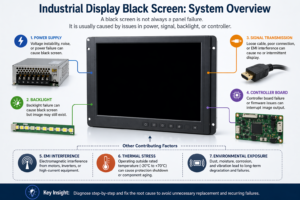
Quick Answer An industrial display black screen is typically caused by: Power supply instability LED backlight …
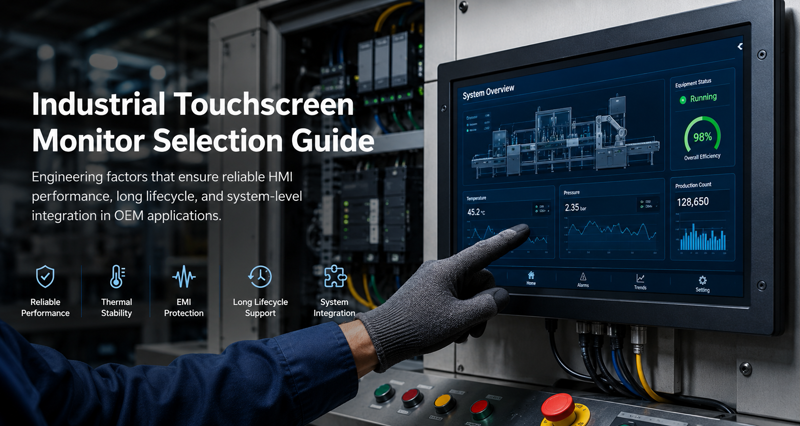
Industrial touchscreen monitor failures are rarely caused by display specifications alone.
In OEM deployments, problems typically appear later during:
For most industrial systems:
Many OEM teams only discover grounding instability, thermal buildup, or touch sensitivity issues after full enclosure assembly, when redesign costs are significantly higher.
If your project requires:
Industrial touchscreen monitor selection should be treated as a system-level engineering and procurement decision rather than a standalone display purchase.
Many integration problems are only discovered after enclosure assembly or field deployment, when redesign costs become significantly higher.
Choosing the wrong industrial touchscreen monitor can lead to integration failure, poor touch responsiveness, operator usability issues, unexpected downtime, and costly redesigns.
Unlike commercial displays, industrial touchscreen monitors must operate reliably in environments with vibration, EMI interference, dust, moisture, temperature fluctuations, and continuous 24/7 operation. In many OEM systems, the touchscreen monitor also affects enclosure design, thermal management, cable routing, grounding strategy, and long-term maintenance.
For industrial equipment engineers and OEM designers, selecting a touchscreen monitor is not only a display decision. It is a system-level engineering decision.
In most industrial projects, engineers evaluate industrial touchscreen monitors based on seven critical factors:
This guide explains how engineers and OEM procurement teams select industrial touchscreen monitors for real-world industrial applications.
For a broader overview of how displays are selected in real systems, including interface types, enclosure design, and mounting considerations, refer to our guide on industrial display monitors.
Industrial touchscreen monitors are designed for environments where reliability, maintainability, and long-term supply continuity are more important than appearance or consumer-grade specifications.
For OEM programs, the monitor often remains in production for many years after the original embedded platform is released.
As a result, engineers must evaluate not only display performance, but also:
Compared with commercial monitors, industrial touchscreen displays typically include:
Consumer-grade displays may function initially in industrial environments, but long-term issues often appear during deployment.
Common field failures include:
For industrial OEM projects, these issues can lead to redesign costs, production delays, and maintenance problems after deployment.
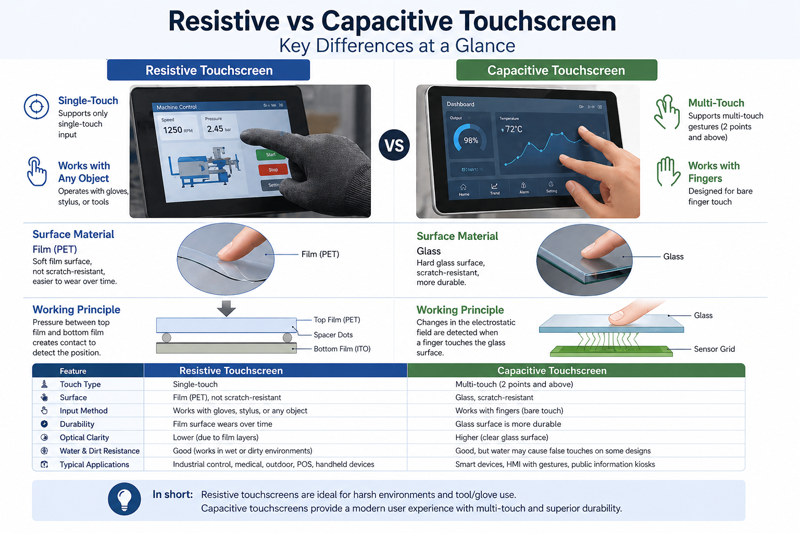
The touch interface directly affects usability, reliability, and environmental performance.
The two most common industrial touchscreen technologies are Projected Capacitive (PCAP) and Resistive Touch.
PCAP is the preferred technology for most modern industrial HMI applications.
Advantages include:
However, PCAP systems are more sensitive to:
Poor grounding or insufficient EMC protection can cause false touches, touch drift, or unstable operation.
Many OEM teams only discover grounding-related touch instability after full enclosure assembly, when cable routing, power supplies, and metal enclosure structures begin interacting under real operating conditions.
Late-stage EMI troubleshooting can significantly increase validation time and redesign cost.
For outdoor or harsh industrial applications, engineers should verify:
Resistive touch technology is still used in industrial systems that prioritize simplicity and compatibility.
Advantages include:
Limitations include:
Resistive touch is still common in:
For approximately 90% of modern industrial HMI systems, PCAP is the preferred touchscreen technology because it supports sealed front surfaces, better durability, and modern user interfaces.
However, resistive touch may still be more suitable for environments involving excessive moisture, heavy contamination, or older control architectures.
Industrial touchscreen monitors are commonly available from 7-inch to 32-inch formats.
Larger displays are not always better.
Engineers should select display size based on:
Overly small UI elements often become difficult to operate in industrial environments where operators wear gloves or work under vibration.
For most industrial applications, Full HD (1920×1080) is sufficient.
Over-specifying ultra-high resolution panels can introduce:
Long lifecycle availability is often more important than maximum resolution.
Many OEMs prioritize stable panel supply over premium display specifications.
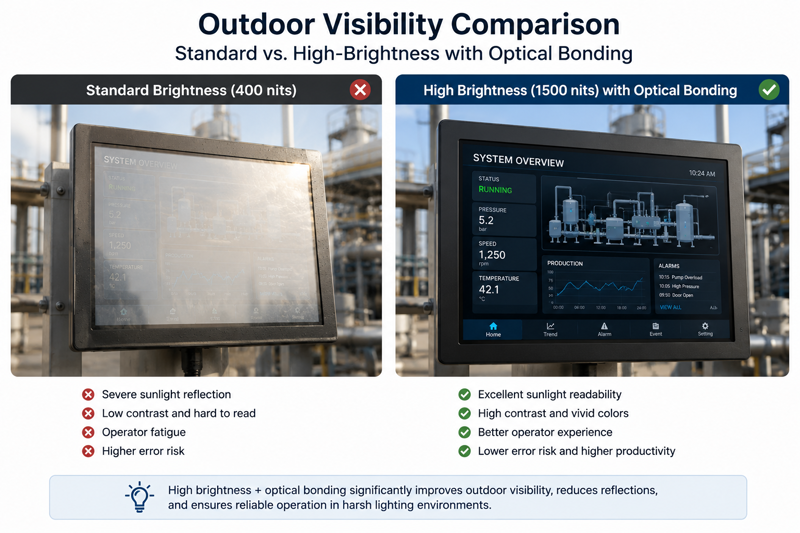
Brightness selection is one of the most commonly underestimated factors in industrial touchscreen monitor projects.
Displays that appear acceptable during office testing often become difficult to read under direct sunlight or high ambient factory lighting.
A monitor that performs well in the laboratory may become unreadable on a factory floor or outdoor installation.
Industrial environments often include:
| Environment | Recommended Brightness |
|---|---|
| Indoor industrial HMI | 300–400 nits |
| High ambient light factory floor | 700–1000 nits |
| Outdoor kiosk or infrastructure | 1000+ nits |
| Direct sunlight applications | 1500+ nits with optical bonding |
Optical bonding improves sunlight readability by reducing reflections between the LCD and cover glass.
However, high-brightness sunlight readable monitors also increase thermal load and power consumption inside sealed enclosures.
In fanless industrial systems, brightness should therefore be evaluated together with enclosure cooling capacity and long-term backlight reliability.
However, increasing brightness above 1500 nits may significantly increase thermal load inside sealed enclosures, especially when integrated with embedded industrial PCs.
In high-temperature environments, engineers should validate enclosure airflow, backlight temperature, and long-term luminance stability during prototype stages.
Mechanical integration problems are a common cause of industrial deployment delays.
The touchscreen monitor must align with:
Common mounting structures include:
Industrial OEM teams frequently encounter:
Even small mechanical mismatches can create reliability problems over long production cycles.
Before finalizing the monitor specification, engineers should validate:
Mechanical integration should be reviewed together with enclosure design rather than treated as a separate purchasing decision.
Industrial touchscreen monitors must integrate reliably with the complete control system.
Compatibility verification should include:
Common interfaces include:
In industrial environments, long cable routing can introduce:
These issues become more severe in CNC systems, high-power automation equipment, and outdoor installations with long cable routing.
Shielded cabling, grounding validation, and EMC testing are often necessary during integration.
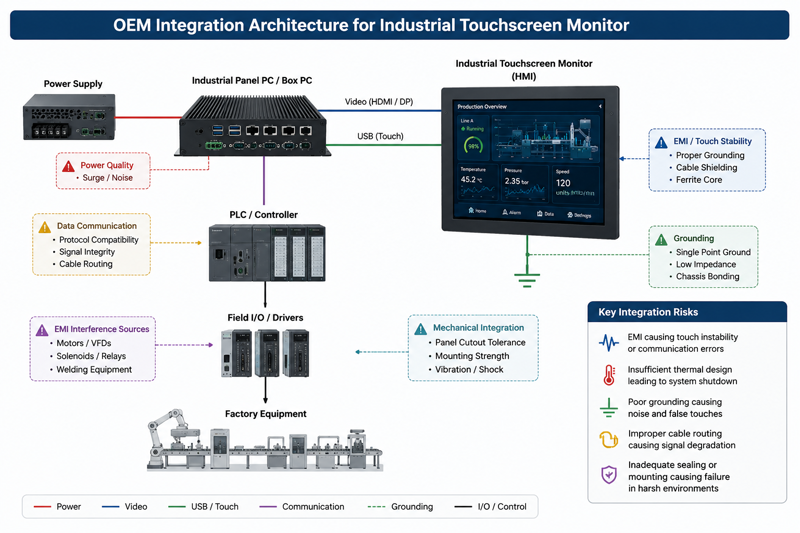
In many industrial systems, touchscreen monitors are integrated into industrial Panel PCs rather than deployed as standalone displays.
OEM teams should evaluate:
System-level integration is often more important than monitor specifications alone.
Industrial touchscreen monitors must maintain stable operation under harsh operating conditions.
Key environmental considerations include:
The required IP rating depends on the operating environment.
| Application Environment | Typical Requirement |
|---|---|
| Indoor control cabinet | IP54 |
| Factory floor HMI | IP65 front |
| Food processing equipment | IP66/IP69K |
| Outdoor infrastructure | IP65/IP67 |
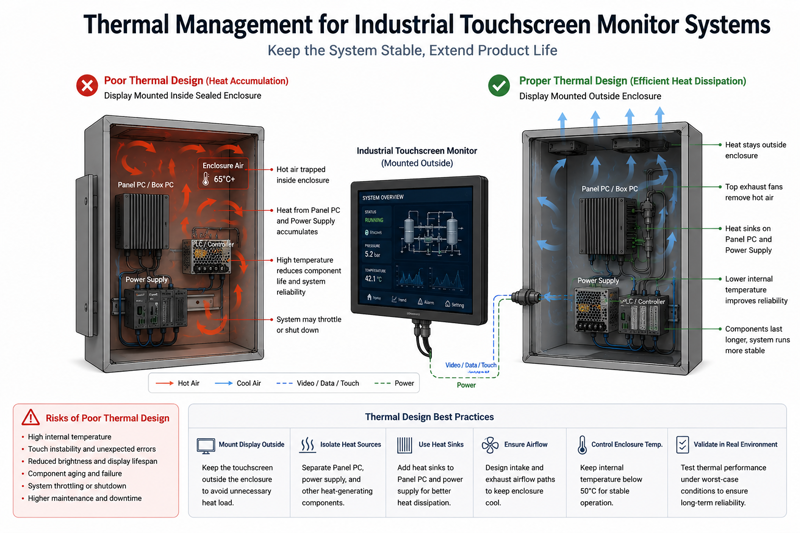
Thermal management is frequently overlooked in industrial display integration.
High-brightness LCD panels generate additional heat.
When combined with:
internal temperatures can rise significantly.
Excessive heat can reduce:
Thermal validation should be part of the system integration process.
High-brightness industrial LCDs may experience accelerated luminance degradation after prolonged operation above 60°C enclosure temperatures.
This issue is more likely in sealed fanless systems with embedded PCs and limited enclosure airflow.
Thermal reliability should therefore be evaluated together with brightness requirements rather than treated as independent specifications.
One of the largest risks in industrial projects is component obsolescence.
Consumer monitors may change every 12–18 months.
Industrial OEM programs often remain active for:
Engineers should confirm:
Unexpected panel changes can require firmware retuning, mechanical redesign, and regulatory recertification.
Long lifecycle stability is often more valuable than short-term hardware cost savings.
| Application | Recommended Touch | Brightness | Typical IP Rating |
|---|---|---|---|
| Factory HMI | PCAP | 400–700 nits | IP65 |
| Outdoor kiosk | PCAP + optical bonding | 1000+ nits | IP65/IP67 |
| Food processing equipment | Resistive or tuned PCAP | 500–1000 nits | IP69K |
| AGV systems | PCAP | 700+ nits | IP65 |
| CNC machinery | PCAP | 400–700 nits | IP65 |
| Marine systems | PCAP with anti-glare coating | 1000+ nits | IP66 |
| Oil and gas equipment | Rugged PCAP | 1000+ nits | IP67 |
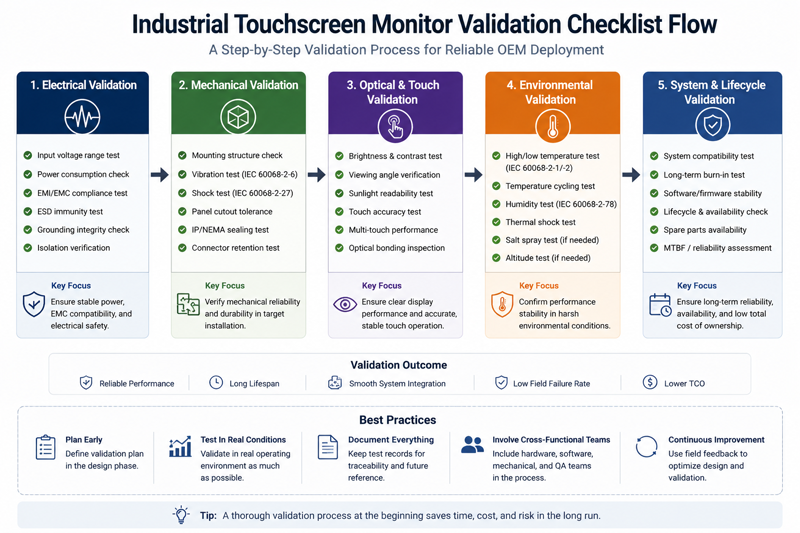
Before approving an industrial touchscreen monitor for production deployment, OEM teams typically validate:
Some OEM teams only identify touch instability after integrating the industrial touch display with high-power motor drives, switching power supplies, or long cable assemblies.
In many cases, the touchscreen operates normally during bench testing but becomes unstable after final enclosure assembly.
Sunlight readable monitors improve outdoor visibility, but higher brightness levels also increase:
Brightness should therefore be evaluated together with enclosure thermal design rather than treated as an isolated display specification.
For food processing environments, IP69K certification alone may not guarantee long-term sealing reliability if cleaning chemicals gradually degrade gasket materials.
Some rugged industrial HMI displays use thicker cover glass for impact protection.
However, thicker glass may reduce PCAP sensitivity unless touch controller firmware is retuned correctly.
Glove performance and water rejection should therefore be validated using production-level hardware.
An OEM team integrating a sunlight readable industrial HMI display into an outdoor charging terminal initially approved the monitor after laboratory testing.
After final enclosure assembly, internal temperatures increased due to the combination of:
The system later experienced backlight dimming and unstable touch response during high-temperature operation.
The issue was resolved by improving enclosure airflow, reducing thermal accumulation, and retuning the PCAP controller.
This type of late-stage redesign is common when display selection is treated as an isolated hardware decision rather than a system-level integration task.
Consumer displays often fail under vibration, dust exposure, and continuous operation.
Short product cycles can create major OEM redesign costs.
Poor EMC performance can cause unstable touch behavior and intermittent failures.
Displays that appear acceptable indoors may become unreadable under real deployment conditions.
Industrial touchscreen monitors affect enclosure design, thermal management, cable routing, and system maintenance.
System-level integration should always be considered during selection.
Standard industrial touchscreen monitors are suitable for many applications.
However, OEM projects often require customization for:
Custom industrial touchscreen monitor solutions can reduce:
For high-volume OEM projects, customization can improve both reliability and deployment efficiency.
Experienced OEM teams often validate:
before finalizing deployment specifications.
Industrial touchscreen monitor selection is not only an engineering task. It is also a long-term procurement and lifecycle management decision.
OEM teams should evaluate:
In long lifecycle industrial programs, supply continuity and integration stability are often more important than peak display specifications.
A monitor with slightly lower performance but stable long-term availability may reduce total deployment cost significantly over the product lifecycle.
For most OEM systems, industrial touchscreen monitor selection should begin with deployment conditions rather than display specifications.
In practice, long-term reliability problems are more commonly caused by:
than by LCD performance alone.
Early validation of grounding, thermal behavior, optical visibility, and lifecycle continuity typically reduces redesign risk later in deployment.
Industrial touchscreen monitor selection affects far more than display quality.
The monitor directly impacts:
For industrial equipment engineers and OEM procurement teams, the best touchscreen monitor is not necessarily the highest specification model.
It is the monitor that integrates reliably into the complete system architecture and continues operating consistently throughout the product lifecycle.
Careful evaluation during the design stage can significantly reduce deployment risk, maintenance issues, and future redesign costs.
Yes. Modern PCAP touchscreen systems can support glove operation when properly tuned. Performance depends on glove thickness, controller firmware, and grounding quality.
Outdoor industrial touchscreen monitors typically require at least 1000 nits. Direct sunlight environments may require 1500+ nits together with optical bonding and anti-glare treatment.
PCAP offers better optical clarity, multi-touch capability, and longer lifespan. Resistive touch is simpler, lower cost, and more tolerant of moisture or contamination.
Industrial OEM systems often remain in production for many years. Stable product availability helps avoid redesigns caused by panel obsolescence or firmware changes.
Yes. In many industrial systems, the display, embedded computer, enclosure, thermal design, and power architecture are closely interconnected.
Before finalizing an industrial touchscreen monitor specification, many OEM teams validate:
during early prototype stages to reduce redesign risk after deployment.
Our engineering team can recommend suitable touchscreen technologies, brightness levels, mounting structures, and integration approaches based on your operating environment and system architecture.
We support:
Early engineering validation can significantly reduce deployment risk and long-term maintenance issues.
Quick Answer An industrial display black screen is typically caused by: Power supply instability LED backlight …
Introduction Industrial display flickering often appears unexpectedly in real deployments such as EV charging stations, factory …
Introduction Outdoor displays are designed for harsh environments, but outdoor industrial display overheating remains one of …

Introduction In OEM system design, touchscreen integration failures are often caused by incorrect assumptions about iOS …
Send your size, brightness, touch type, interface, mounting method, environment, and target quantity — early-stage projects are welcome.